Having problems downloading?
- Download WordPipe - Installer signed by DataMystic. Works on Windows 10/11 and earlier
- Open in Microsoft Store Having trouble installing? Try the Microsoft Store version (no admin rights needed)
- Download WordPipe ZIP file
- Check the download help.
Step 1: Run the Installer
Once the download completes, double-click the file to start installation.
Step 2: Windows SmartScreen Warning
You may see "Windows protected your PC":
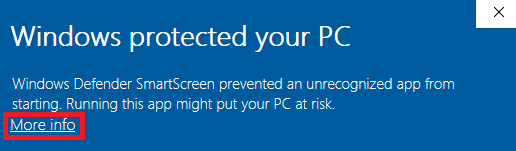
If this appears:
- Click More info
- Click Run anyway
Antivirus False Positive
WordPipe is digitally signed by DataMystic. If your antivirus warns about the file, it may be a false positive on new releases. You can safely allow or allow-list the installer.
Corporate IT Restrictions
If your organisation blocks installations, use the Microsoft Store version instead (no admin rights needed):
Getting Started
After installing (see the guide), you'll want to get stuck into WordPipe.
- On the Actions tab, add a row for each pair of Find What/Replace With values
- For each row, check the Search Location where you expect the text to be found. Remember to check Inside Hyperlink Addresses if you are changing hyperlinks
- On the Files to Process tab, set the Start Folder to the location of your documents. If you are using Word 2007, set the File Type to *.doc*. Remember to check Include Subfolders if you want subfolders searched as well. You can also drag and drop your files from Windows Explorer into WordPipe
- On the Options tab, check the Backup Mode option, and any other options you need.
- Click [Start Replacing] or [Search Only] depending on whether you want to Replace or just Find the text.

WordPipe is our multiple search and replace solution for Microsoft Word documents (*.doc).
- for Microsoft Excel (*.xls) - download ExcelPipe, or click here for more info
- for Microsoft PowerPoint (*.ppt) - download PowerPointPipe, or click here for more info
- for text files (*.txt, *.htm, *.xml, *.csv, *.tab, *.prn etc) - download TextPipe Pro, or click here for more info
Once the file starts downloading, continue browsing here, or download more here.
Please subscribe (at the left) to receive DataMystic's free newsletter of product upgrades, discounts and special promotions.
Full Documentation
Full documentation is available from the application's help file, which can be accessed through the Start Menu, through the application's Help Menu, and by pressing F1 when the application is running.
Buy Now - Purchasing Instructions
You can purchase through our online store, or with our offline ordering instructions.
System Requirements
Our software runs under Microsoft® Windows® 11, 10, 8, 7, Vista®, 2019/2016/2012/2008/2003, x32 and x64, and requires 32 MB of memory.
Upgrade Policy
Our products come with a year of free upgrades. After then, you can purchase an optional Extended Upgrade Package to stay current.
Copyright & Licensing
This program is protected by copyright law and international treaties. View the full license agreement here. Please contact us if you have any queries.
Release Notes
Note: Will not work with Word Starter Edition (this is a cut-down version with zero integration capability)Read Release Notes