Downloading TextPipe Standard...
Finish setup in 1 click - Get 10% off
Once the download completes, double-click in your browser download bar to start installation.
Digitally signed by DataMystic. Works on Windows 10/11 and earlier
As used by thousands of data professionals worldwide, TextPipe Standard is the trusted choice for data manipulation and automation. With a 4.8/5 rating from over 500 reviews, it's the go-to tool for anyone serious about working with data.
Trouble installing? See these options:
- Download TextPipe Standard - In a corporate environment, you may need to take additional steps to install it, see below
- Download TextPipe Standard ZIP file - works around corporate download restrictions
- Open in Microsoft Store Minimal installer, no admin rights needed. Misses a lot of useful samples, shell extensions etc
- Check the download help.
TextPipe Standard installation troubleshooting tips
1: The app you're trying to install isn't a "Microsoft-verified app"
Windows may show this warning because TextPipe Standard is downloaded from our website rather than the Microsoft Store. This is normal for most desktop software, despite it being digitally signed etc. It is basically Microsoft trying to strangle the software market and force all installs via the Microsoft Store.
To install:
- Click Install anyway in the dialog, or
- Click Change app recommendation settings
If the "Install anyway" option is not shown, you need to change your Windows settings:
- Open Settings > Apps > Advanced app settings
- Under Choose where to get apps, select Anywhere
- Run the installer again
On older Windows 10 versions: Settings > Apps > Apps & features, then change the dropdown at the top.
Alternatively, install the Microsoft Store version which does not require this setting, but also excludes all the things you expect from desktop software like context menus in Windows explorer etc
2: Windows SmartScreen Warning
You may see "Windows protected your PC":
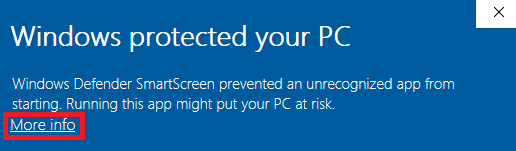
If this appears:
- Click More info
- Click Run anyway
3: Antivirus False Positive
TextPipe Standard is digitally signed by DataMystic. If your antivirus warns about the file, it may be a false positive on new releases. You can safely allow or allow-list the installer.
4: Corporate IT Restrictions
If your organisation blocks installations, use the Microsoft Store version instead (no admin rights needed):

- TextPipe Online Demos and Frequently Asked Questions (FAQ)
- If you have trouble setting up transformations yourself, why not pay one of our data transformation consultants to do it for you?
Release Notes
Read Release Notes